An AI agent is a language model that can use tools and works in a loop until the task is done. That is the whole secret; everything else is detail.
Everyone talks about AI agents today, but few can explain what an agent really is. In this article we first explain the difference between a chatbot and an agent, and the middle stage that the big chat assistants offer today. Then we look at the building blocks of an agent, and finally at five concrete ways to build an agent yourself.
Chatbot or AI agent: what is the difference?
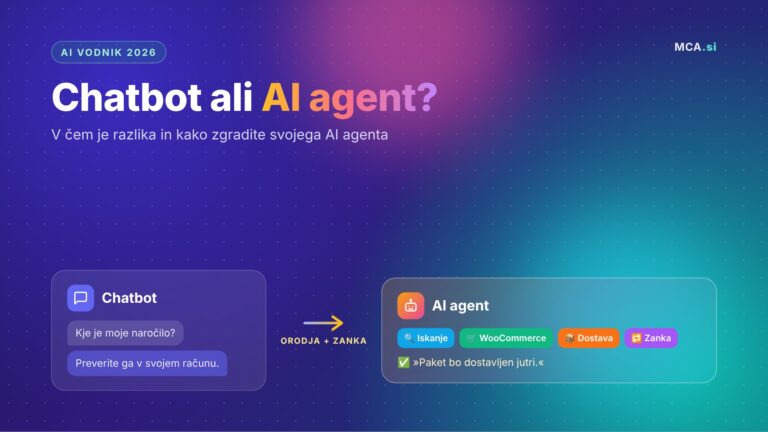
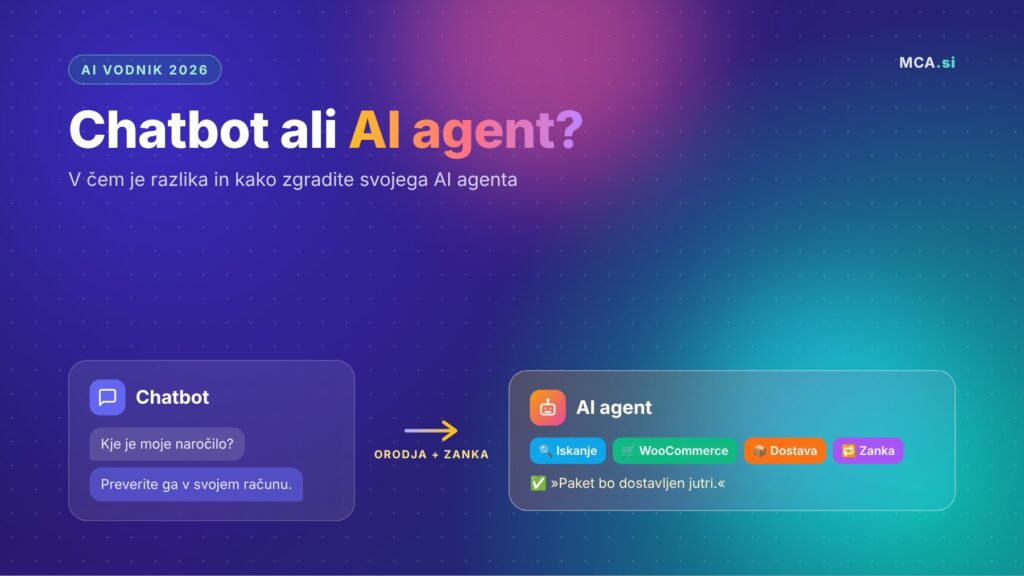
A chatbot answers a question, an agent completes a task. Two additional abilities make the difference: tool calling and working in a loop.
An ordinary chatbot, or a “bare” language model (LLM), can do only one thing: return text in response to your message. It cannot check e-mail, look something up on the web, book an appointment or update a record in a database. It can tell you how you would do it, but it does not do it itself.
An AI agent is the same LLM with two upgrades:
- Tool calling – the agent can take actions in the real world: search the web, read files, call APIs, write to a database.
- Loop – the agent does not stop after one answer. It continues on its own, step by step, until the goal is reached.
| Chatbot | AI agent | |
|---|---|---|
| Input | A question | A goal or task |
| Output | Text | Completed work + report |
| Access to systems | No | Yes, through tools |
| Number of steps | One answer | As many as the task needs |
| Who performs the action | The user | The agent |
An example from an online store. A shopper asks: “Where is my order #4821?”
- A chatbot answers in general terms: “You can check your order status in your account or call support.”
- An AI agent calls a tool for the WooCommerce API and reads the order, then calls the delivery service API to track the parcel. From both results it composes the answer: “The order was shipped yesterday, the parcel is at the distribution center and will be delivered tomorrow.”
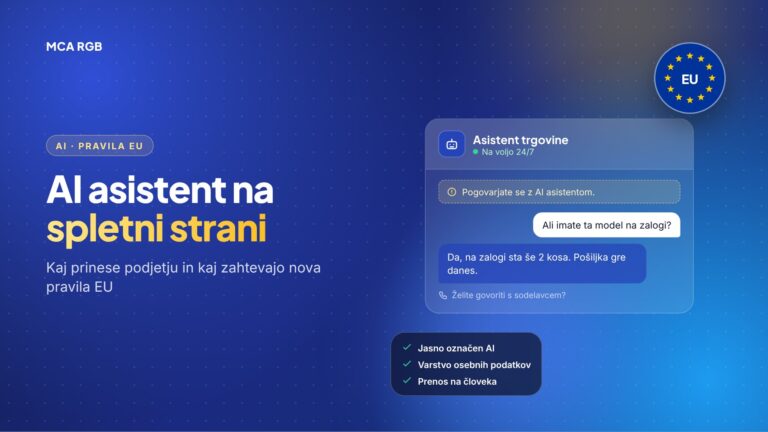
The model can be exactly the same in both cases. The difference is in what is built around it. What a chatbot brings to a website and what the new EU rules require is described in the article AI assistant on your website.
The middle stage: from chatbot to agent
Between an ordinary chatbot and an agent you program yourself there is now a wide middle stage. The big chat assistants (ChatGPT, Claude, Gemini, Grok, Kimi, Perplexity, Copilot) let you assemble an agent right in their interface, without a line of code.
The path from chatbot to agent has four stages:
| Stage | What it can do | Example from an online store |
|---|---|---|
| Ordinary chatbot | Answers a question from general knowledge. | “Write a description for hiking boots.” |
| Customized assistant | Has saved instructions, reference files and an agreed way of answering. | An assistant that writes descriptions in the tone of your brand and from your price list. |
| Agent with tools | Chooses the steps itself, uses connected apps and carries the task through to the agreed result. | Reads product data in the store, prepares a description and saves it as a draft. |
| Automated agent | Repeats the procedure on a schedule or on a supported event (e-mail, message, webhook). | Every Monday it prepares a sales report and sends it to the team. |
A customized assistant (for example the former Custom GPT or a Gemini Gem) is not yet a real agent. It follows instructions very well, but it does not act independently. It becomes an agent when it gets tools and a loop. It becomes an automated agent when a schedule or an event triggers it instead of you.
For most companies this middle stage is the fastest route to a first agent. How to approach it on individual platforms is described below, under the first level of building.
The five building blocks of every agent
Every agent, regardless of the tool it is built in, stands on the same five building blocks.
| Building block | Analogy | What it does |
|---|---|---|
| Language model (LLM) | Brain | Predicts which text comes next. It has no hands and no memory of its own. |
| Tool calling | Hands | The model outputs a structured command (e.g. “call web search with question X”), the code around it executes the command and returns the result to the model. |
| Context window | Working memory | Everything the model currently “sees”: instructions, conversation history, tool calls and their results. Its size is limited. |
| System prompt and message roles | Job description | The system prompt sets the identity and the rules; messages are labeled system, user or assistant. |
| Vector database (RAG) | Long-term memory | Stores data as vectors (embeddings). With a tool, the agent finds and loads only the relevant parts. |
A few key points:
- The model itself executes nothing. It only decides which tool it would call. The program code around the model (the so-called harness) actually executes the command and returns the result. This division of labor is worth understanding, because it is the core of every agent.
- The model has no memory between calls. At every step the whole relevant history has to be sent into the context window again. If you do not do that, the agent “forgets” what it was doing a minute ago.
- Context engineering is a new skill. Because the window is limited, the quality of an agent depends largely on what you put into it and what you leave out. Too much noise worsens decisions, too little data leads to guessing.
- Example of a system prompt: “You are a customer support assistant for store X. Answer in English. Never guess order data; always check it with a tool.”
- RAG in practice: a catalog of 5,000 products does not fit into the context window. Store it in a vector database, and when asked “do you have waterproof hiking boots under €100?” the agent loads only a few of the most relevant products.
The agent loop: think, act, observe, repeat
The agent loop connects all five building blocks into a whole that reaches the goal on its own.
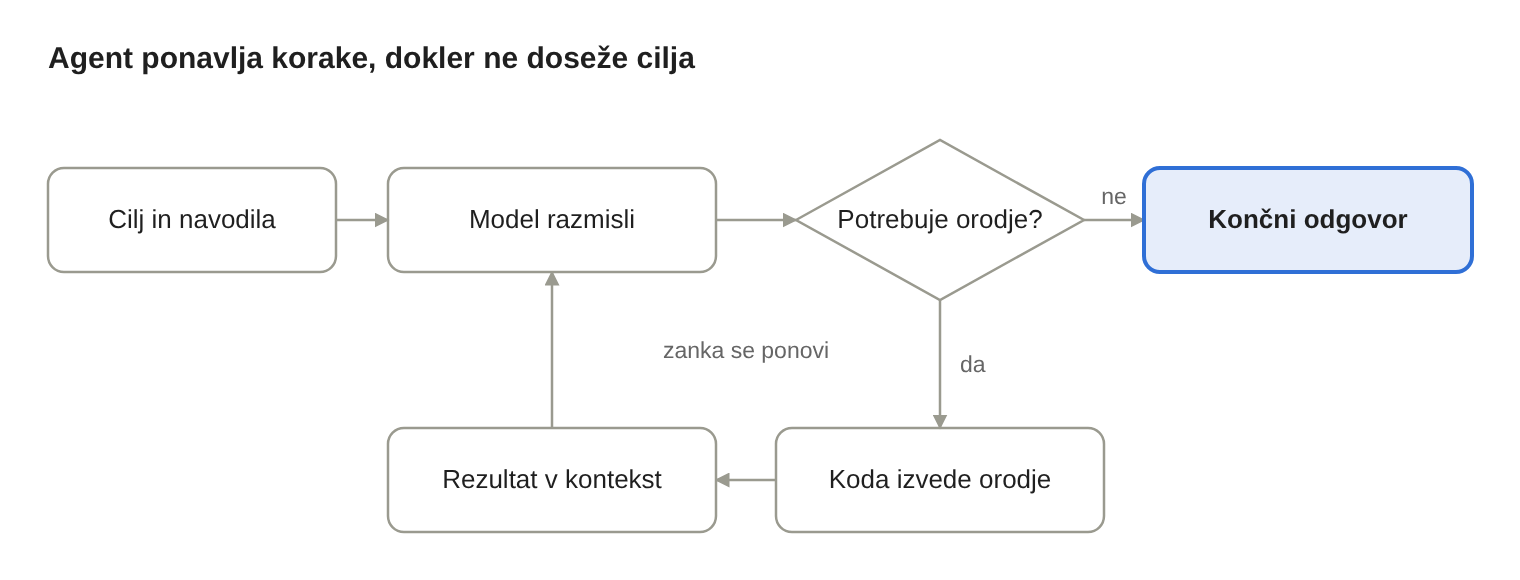
The loop starts with the system prompt and the goal. The model thinks and decides: does it need a tool, or can it already answer? If it needs a tool, the code runs it and the result is added to the context window. The model “observes” the result and decides on the next step. The cycle repeats until the task is done.
In practice always add a safeguard, e.g. a maximum of 10 steps, so that an error does not leave the agent spinning forever and burning tokens.
Four decisions before you build
Whether you “click together” an agent or program it, you make the same four decisions.
- Platform or framework – where the agent will run (chat assistant, no-code tool, n8n, agent harness or your own code).
- Model – e.g. GPT, Claude or Gemini. A more capable model follows instructions and picks tools better, but costs more per call.
- Context – which data the agent can access: product database, orders, documentation, past conversations.
- Tools and flow – which tools the agent may call, in what order, and where it must stop or ask a human.
A practical tip: start with the smallest set of tools. An agent with two well-described tools is more reliable than an agent with twenty that overlap.
How to build an AI agent: five levels
You can build an agent in five ways, from settings in the chat assistant you already use to your own code. Each next level gives you more control and requires more technical knowledge.
Level 1: An agent in the chat assistant you already use
The easiest route to an agent is often in the tool you already pay for. You describe the task to the agent in plain language, connect your apps and save a successful procedure for reuse.
- How: you write standing instructions, add reference files, connect apps and save the procedure as a “Skill”. Then, if needed, you give it a schedule or a trigger.
- Advantage: no new platform and no installation; the agent works where you already have your documents and connections.
- Drawback: you are tied to the provider, its plans and usage limits. Feature availability differs by subscription and region.
What the individual platforms offer (as of November 2026):
| Platform | How you assemble an agent | Execution and limits |
|---|---|---|
| Grok Bot (xAI) | You create a named bot, define the task and sources in conversation and connect apps. You save procedures as Skills. | Its own computer in the cloud (browser, files, terminal), memory, collaboration between several bots and Routines. Usage is limited by plan. |
| ChatGPT (Work and plugins) | Plugin Creator combines instructions, reference files and connected apps. Work carries out a multi-step task. | Workspace Agents for companies add sharing, schedules and API triggers. For your own development: Agents SDK. |
| Claude | You add instructions, Skills, connectors and plugins. You save a successful procedure as a Skill. | Supports recurring, scheduled tasks. For your own development: Claude Agent SDK. |
| Kimi (Agent, Swarm, Claw) | You create a Skill from instructions or documents. Swarm splits a larger task among subagents by itself. | Claw is a permanent assistant in the cloud with memory, tools and schedules. |
| Gemini (Gems and Opal) | A classic Gem follows instructions and knowledge. Opal builds a multi-step mini app from a description. | Opal is an experiment (personal accounts, web, English). For developers: ADK. |
| Microsoft Copilot Studio | In a guided editor you describe the agent, add knowledge, tools and triggers, and test it. | Business processes in the Microsoft environment, publishing to supported channels, reacting to events. |
| Perplexity Computer | You describe the goal, connect apps and add Skills. The system can bring in subagents. | Research, work in the browser, running in the background and recurring monitoring. |
A note on ChatGPT: new Custom GPTs on personal accounts are no longer the recommended way to start. The standard retirement is planned for 11 December 2026; exceptions and other deadlines apply to some workspaces. Check the notice in your account.
From first task to automation in five steps. The procedure is similar on all platforms:
- Create an agent with one clear task. Define the name, area of work, sources, format of the result and standing rules.
- Connect the sources. The agent needs actual access to the apps and data you mention in the instructions.
- Test on a real, limited task. Review the result and correct the instructions. Save a successful procedure as a Skill and check it on other input data as well.
- Add a schedule or trigger. Define when the agent starts, what it gets as input, what the final result is and what it should do if a source is missing.
- Set up oversight. Define the actions for which the agent must always ask for approval, for example before publishing or sending a message. With Grok Bot, keep in mind that bots of the same user share a computer, files and logged-in sessions, so a separate role does not mean separate access.
An example of a starting instruction for an online store agent:
You are a content agent for an online store. For 20 products from the attached table, prepare descriptions in English (150–200 words) with a title, key features and a meta description. Use only data from the table and the technical sheets. If a piece of data is missing, mark it “CHECK”. Return the result in a table for review.
How to compare platforms: pick one process and the same small sample, for example 10 products for which you know the correct result. Compare the platforms by accuracy, verifiability of sources, number of manual corrections, actual usage and success in accessing tools.
Level 2: No-code platforms
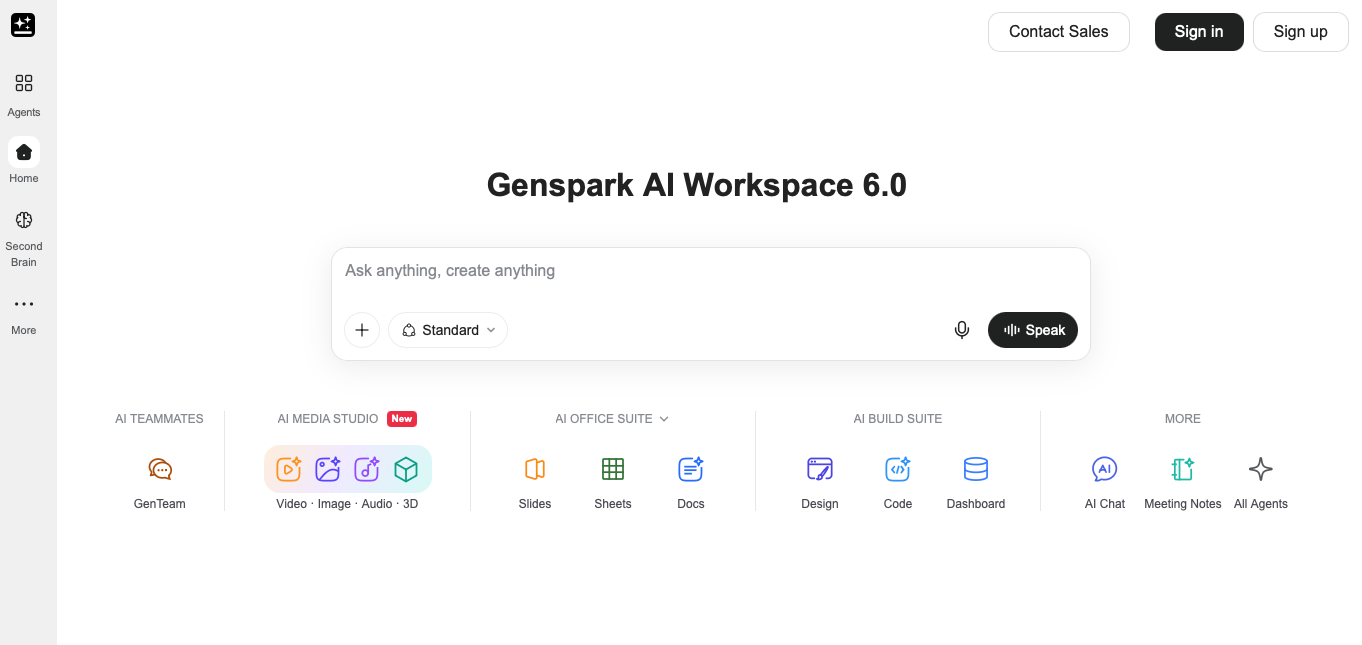
You set up the agent by filling in forms or dragging blocks. Examples of platforms: GenSpark, Lindy, Gumloop, Stack AI, Relevance AI, Botpress, Voiceflow and OpenAI Agent Builder.
- How: you write a prompt that describes the role of the agent, which tools it should use and in what form it should return the result.
- Advantage: a working agent in a few minutes.
- Drawback: little control. The result is often similar to a general assistant with tools plugged in.
This is what the GenSpark start screen looks like. You describe the task in a single field, and the platform offers ready-made agents for presentations, spreadsheets, documents, design, code, dashboards, and video, images and audio. Under All Agents you find the full set.
Level 3: Low-code
Visual editors where you connect building blocks and add a block of code when needed. Examples: n8n, Flowise, LangFlow, Dify, Activepieces, KNIME, Make and Microsoft Copilot Studio.
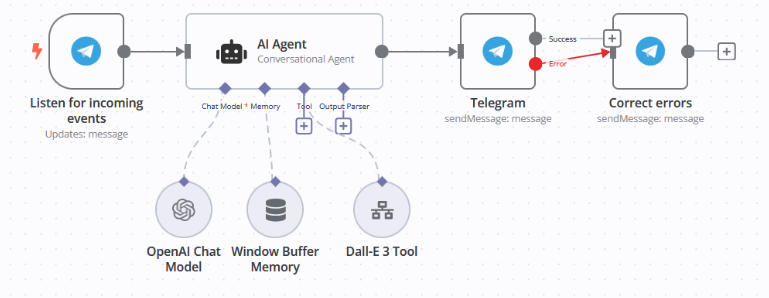
- How in n8n: you add an AI Agent node, set its system message, then plug in tools (e.g. Perplexity for web search, Wikipedia for facts) and conversation memory.
- Advantage: much more control over the properties of the agent and a more consistent loop. Easy to connect with existing systems (WooCommerce, e-mail, CRM, Google Sheets).
- Drawback: requires basic technical understanding; complex flows become hard to follow.
This is what an agent in n8n looks like. A message from Telegram triggers the AI Agent node, which has three building blocks plugged in: a language model (OpenAI Chat Model), conversation memory (Window Buffer Memory) and an image generation tool (DALL-E 3). The answer goes back to Telegram, and on an error the flow automatically sends a corrected message.
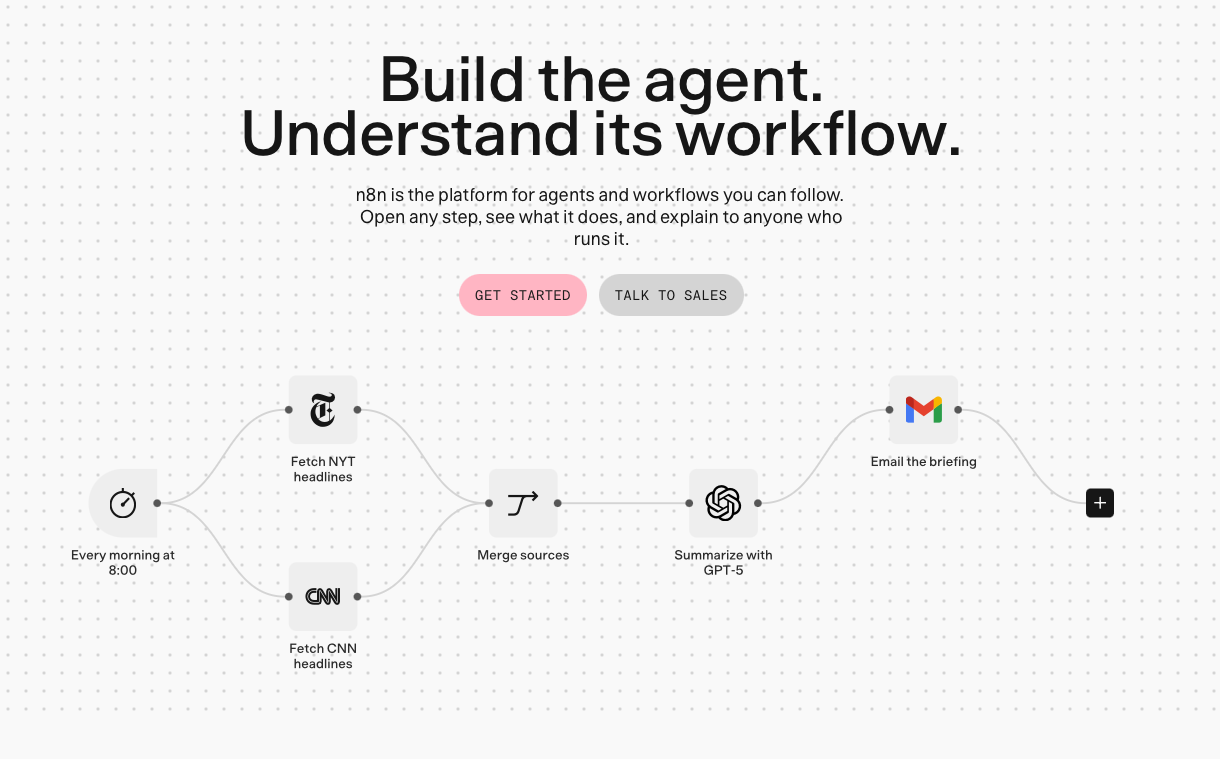
In n8n you can also include an agent in a wider automated flow. The example below starts by itself every morning at 8:00: it collects news from two sources, merges them, prepares a summary with GPT-5 and sends it by e-mail.
Level 4: Agent harness
You install a ready-made, capable agent and adapt it. The leading ones are OpenClaw and Hermes Agent; the latter is focused on long-term memory.
- How: the loop, memory and basic functions are already built. You add your own instructions (e.g. a research assistant “skill”) and plug in the tools you need.
- Advantage: a production-ready agent without writing the loop from scratch.
- Drawback: it requires installation, often on your own server (VPS), and maintenance.
Level 5: Full code
You write the whole agent yourself, usually in Python, optionally with a framework such as LangGraph. You have full control: the system prompt, tool definitions (JSON schemas), response handling and the loop itself.
Below is a minimal but working agent with Python and the Anthropic SDK. The model decides by itself whether to call search, the code runs the search and returns the result to the model, and the loop runs until the model gives a final answer.
import anthropic

client = anthropic.Anthropic()  # key in the ANTHROPIC_API_KEY variable

# 1) Tool definition: name, description and JSON schema of the input
tools = [{
    'name': 'web_search',
    'description': 'Searches the web and returns short summaries of the results.',
    'input_schema': {
        'type': 'object',
        'properties': {'query': {'type': 'string', 'description': 'Search query'}},
        'required': ['query'],
    },
}]

def web_search(query: str) -> str:
    # Call a real search API here (e.g. Perplexity, Tavily, SerpAPI)
    return f'Results for: {query} ...'

# 2) System prompt and goal
SYSTEM = 'You are a research assistant. Always cite your sources.'
messages = [{'role': 'user', 'content': 'What is new with AI agents this month?'}]

# 3) Agent loop: think -> act -> observe -> repeat
for step in range(10):  # safeguard against an endless loop
    response = client.messages.create(
        model='claude-sonnet-5-5',
        max_tokens=2048,
        system=SYSTEM,
        tools=tools,
        messages=messages,
    )
    messages.append({'role': 'assistant', 'content': response.content})

    # The model wants no more tools -> final answer
    if response.stop_reason != 'tool_use':
        print(''.join(b.text for b in response.content if b.type == 'text'))
        break

    # Run all requested tools and return the results to the model
    tool_results = []
    for block in response.content:
        if block.type == 'tool_use':
            result = web_search(**block.input)
            tool_results.append({
                'type': 'tool_result',
                'tool_use_id': block.id,
                'content': result,
            })
    messages.append({'role': 'user', 'content': tool_results})
All the building blocks are visible in this code: the model, the tool definition, the system prompt, the context window (the messages list, which grows with every step) and the loop. Everything that platforms on the lower levels hide is in plain sight here.
Which approach to choose?
Choose the lowest level that still solves your problem. The same model and the same loop run on all five levels; the only difference is how much you build yourself and how much the platform gives you.
| If you need … | Choose | Example tools |
|---|---|---|
| A quick solution in a tool you already use, without a new platform | An agent in a chat assistant | ChatGPT Work, Claude, Grok Bot, Gemini Gems |
| A quickly working solution without programming | A no-code platform | GenSpark, OpenAI Agent Builder |
| Real logic, branching and connections to several services, without maintaining code | Low-code | n8n, Make |
| Business agents in the Microsoft environment | Low-code | Copilot Studio |
| A capable, production-ready agent that you adapt | An agent harness | OpenClaw, Hermes Agent |
| Full control, deep integration into your own product, or understanding of every part | Full code | Python, LangGraph |
Examples for an online store:
- Product descriptions and replies to shoppers based on confirmed product data → an agent in a chat assistant with a saved Skill and a connection to the catalog.
- Automatic answers to questions about order status → n8n with a WooCommerce node and an AI Agent node.
- An agent that reviews stock at night, compares competitor prices and prepares a report → an agent harness on your own VPS.
- An agent that synchronizes orders with the ERP system and works out the cause itself when errors occur → full code, because you need control over every step and reliable logging.
Frequently asked questions
Is ChatGPT an AI agent?
By itself it is a chatbot. When you give it tools (web search, connected apps) and let it carry out multi-step tasks independently, it works as an agent.
Do I need a programmer for an AI agent?
Not necessarily. On the first two levels you assemble an agent without code. For a connection to an ERP system, your own database or more demanding automations, programming is usually needed.
Is an AI agent safe for company data?
It depends on the access you give it. Give the agent only the access it really needs, and always require your approval for sensitive actions (sending, publishing, payments). If it processes personal data, take GDPR into account as well.
What is the best first agent for a company?
A task that repeats every week and has a clear result: a weekly report, preparing product descriptions or sorting inquiries.
Conclusion
An AI agent is not magic. It is a language model with hands (tools), working memory (the context window) and persistence (the loop). Once you understand that, you quickly tell real agents from chatbots with a new label. It also becomes easier to decide whether your problem needs a few sentences of instructions in a chat assistant, a form in a no-code tool or a hundred lines of Python.
Need an AI agent for your company?
At MCA RGB we design and build AI agents that connect with your online store, CRM and ERP system. Read more about what we can automate on the AI automation for business page, and for conversations with customers on your website see our AI chatbot.
Contact us and together we will find the first task an agent can take over.